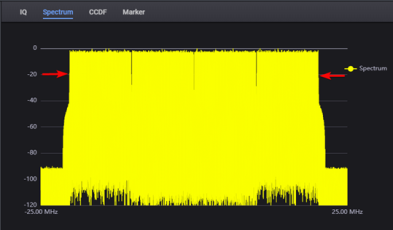
Advanced Waveform Utility
Number of Samples (Waveform Length)
Sets the sample rate of waveform which will be downloaded into hardware.
|
SCPI Command |
[:SOURce]:RADio:AWU:WAVeform:SRate <real> [:SOURce]:RADio:AWU:WAVeform:SRate? |
|
SCPI Example |
|
|
Notes |
The max value is determined by the combined imported waveforms. |
|
Couplings |
If Waveform has only one carrier, this setting will be coupled with original sample rate of imported waveform file and Resampling Ratio applied on imported waveform file. If there are more than one carrier, this value is determined by the combination of imported waveforms. |
|
Preset |
100 MHz |
|
State Saved |
Yes |
|
Min |
1e3 |
|
Max |
128e9 |
|
Resolution |
1 |
| Initial S/W Revision |
A.19.03 |
Specifies the waveform length. The max value is determined by the combined imported waveforms.
For this release, only one imported waveform file is supported. Therefore, the value is the Number of Samples of imported waveform file*Resampling Ratio.
|
SCPI Command |
[:SOURce]:RADio:AWU:WAVeform:LENGth? |
|
SCPI Example |
|
|
Notes |
The max value is determined by the combined imported waveforms, if only one imported waveform file is supported, so its value is Number of Samples of imported waveform file*Resampling Ratio |
|
Couplings |
Coupled with sample rate of imported waveform file and Resampling Ratio, waveform sample rate and repeated Number of every carrier. |
|
Preset |
10000 Sa |
|
State Saved |
Yes |
|
Min |
1 |
|
Max |
1024*1024*1024 |
|
Resolution |
1 |
| Initial S/W Revision |
A.19.03 |
Set the Time Scale Factor of the sample rate.
|
SCPI Command |
[:SOURce]:RADio:AWU:WAVeform:TSFactor <real> [:SOURce]:RADio:AWU:WAVeform:TSFactor? |
|
SCPI Example |
|
|
State Saved |
Yes |
|
Min |
0.001 |
|
Max |
1000 |
| Initial S/W Revision |
A.19.03 |
Enables or disables the mirror spectrum for the waveform.
|
SCPI Command |
[:SOURce]:RADio:AWU:WAVeform:MIRRor:SPECtrum ON|OFF|1|0 [:SOURce]:RADio:AWU:WAVeform:MIRRor:SPECtrum? |
|
SCPI Example |
|
|
Preset |
Off |
|
State Saved |
Yes |
|
Choices |
On | Off |
| Initial S/W Revision |
A.19.03 |
This section contains the settings to view/edit the waveform header information after the waveform generation.
When you generate a waveform, the RMS power and RF occupied bandwidth (OBW) will be measured and automatically shown in the Waveform Header > RMS Power and RF Occupied Bandwidth settings.

You also have the option to edit the RMS Power and OBW in the waveform header of the generated waveform. You set the User Defined Header to On to edit these settings after waveform generation.
This setting is available after the waveform is generated.
When the User Defined Header is ON, you can edit the RMS and OBW settings based on the default values. Then the generated wfm header is updated with these user defined values.
|
SCPI Command |
RADio:AWU:WAVeform:HEADer:STATe |
|
SCPI Example |
RADio:AWU:WAVeform:HEADer:STATe 0|1|OFF|ON |
|
Choices |
ON | OFF |
|
Preset |
OFF |
|
State Saved |
Yes |
| Initial S/W Revision |
A.19.03 |
This setting is available after the waveform is generated.
When the User Defined Header is ON, you can edit the RMS Power setting. Then the generated wfm header is updated with this user defined value.
|
SCPI Command |
RADio:AWU:WAVeform:HEADer:RMSPower |
|
SCPI Example |
RADio:AWU:WAVeform:HEADer:RMSPower 1 |
| Couplings | Available when the User Defined Header setting is ON |
|
Preset |
1 |
| Min | 0 |
| Max | sqrt(2) |
|
State Saved |
Yes |
| Initial S/W Revision |
A.19.03 |
This setting is available after the waveform is generated.
When the User Defined Header is ON, you can edit the RF OBW setting. Then the generated wfm header is updated with this user defined value.
|
SCPI Command |
RADio:AWU:WAVeform:HEADer:OBW |
|
SCPI Example |
RADio:AWU:WAVeform:HEADer:OBW 100000000 |
| Couplings | Available when the User Defined Header setting is ON |
|
Preset |
1e8 |
| Min | 0 |
| Max | 128e9 |
|
State Saved |
Yes |
| Initial S/W Revision |
A.19.03 |
|
SCPI Command |
[:SOURce]:RADio:AWU:WAVeform:MARKer:STATe true|false [:SOURce]:RADio:AWU:WAVeform:MARKer:STATe? |
|
SCPI Example |
[:SOURce]:RADio:AWU:WAVeform:MARKer:STATe true |
| Couplings | This setting is available after you click Generate. |
|
Preset |
OFF |
|
State Saved |
Yes |
|
Range |
ON|OFF |
| Initial S/W Revision |
A.19.03 |
|
SCPI Command |
[:SOURce]:RADio:AWU:WAVeform:MARKer:M1Pattern [:SOURce]:RADio:AWU:WAVeform:MARKer:M1Pattern? |
|
SCPI Example |
[:SOURce]:RADio:AWU:WAVeform:MARKer:M1Pattern "1,1" |
|
Couplings |
Visible when the User Defined Marker is enabled. |
|
Preset |
“” |
|
State Saved |
Yes |
| Initial S/W Revision |
A.19.03 |
|
SCPI Command |
[:SOURce]:RADio:AWU:WAVeform:MARKer:M2Pattern [:SOURce]:RADio:AWU:WAVeform:MARKer:M2Pattern? |
|
SCPI Example |
[:SOURce]:RADio:AWU:WAVeform:MARKer:M2Pattern "1,1" |
|
Couplings |
Visible when the User Defined Marker is enabled. |
|
Preset |
“” |
|
State Saved |
Yes |
| Initial S/W Revision |
A.19.03 |
|
SCPI Command |
[:SOURce]:RADio:AWU:WAVeform:MARKer:M3Pattern [:SOURce]:RADio:AWU:WAVeform:MARKer:M3Pattern? |
|
SCPI Example |
[:SOURce]:RADio:AWU:WAVeform:MARKer:M3Pattern "1,1" |
|
Couplings |
Visible when the User Defined Marker is enabled. |
|
Preset |
“” |
|
State Saved |
Yes |
| Initial S/W Revision |
A.19.03 |
|
SCPI Command |
[:SOURce]:RADio:AWU:WAVeform:MARKer:M4Pattern [:SOURce]:RADio:AWU:WAVeform:MARKer:M4Pattern? |
|
SCPI Example |
[:SOURce]:RADio:AWU:WAVeform:MARKer:M4Pattern "1,1" |
|
Couplings |
Visible when the User Defined Marker is enabled. |
|
Preset |
"" |
|
State Saved |
Yes |
| Initial S/W Revision |
A.19.03 |